iOS Background NFC Tag Reading on iPhone
iOS Background NFC Tag Reading is a feature in iOS that allows native and 3rd party iPhone apps to read NFC tags and react appropriately without having an app open in the foreground or the user having to take an explicit choice to read an NFC tag. Background NFC Tag Reading is not as full featured as reading NFC tags in the foreground via the Core NFC framework, but it handles the common use case for NFC tags for Connected Things projects. Most importantly an app is not required to be installed to use NFC tags, so the barrier to usage is significantly lower than if an app is required. Background NFC Tag Reading is only supported on the iPhone XS and newer.
Contents
How Background NFC Tag Reading Works
For iPhone models that support Background NFC Tag Reading, the user experience of interacting with an NFC tag is designed to be as simple and smooth as possible. When an iPhone detects an NFC tag it performs the following steps, most of which the user does not see:
- Determines if the NFC chip is NDEF formatted and contains at least one NDEF record
- Parses the 1st NDEF record and checks if it’s a supported NDEF record type and URL scheme
- If the 1st NDEF record is supported, the appropriate iPhone app to handle the NDEF record is determined
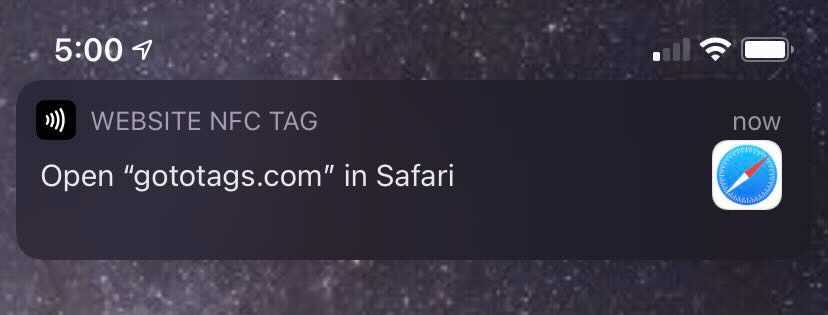
- A pop-up notification is displayed showing the user basic information about what the NFC tag contains and what app with handle the action
- The user must click on the pop-up to perform the action; this is an op-in privacy/security feature
- The action is performed
Background NFC Tag Reading Limitations
There are couple requirements and limitations for iOS Background NFC Tag Reading, but for most Connected Things projects these are not an issue. For Background NFC Tag Reading to work, the following must be true:
- A supported model of iPhone; this is the biggest issue, but as time goes on and consumers upgrade this becomes less of an issue
- The NFC tag must be encoded with a supported NDEF record, most often an NDEF website record to trigger opening the URL in a web browser
- The iPhone app is registered for the specific URL scheme; the Safari app handles NDEF website records which again covers most use cases
- The iPhone app has registered an associated domain entitlement
- The iPhone must have been unlocked once since startup
- A Core NFC session or Apply Pay transaction must not be in progress
- The camera is not in use
- Airplane mode is not enabled
Supported URL Schemes for Background NFC Tag Reading
Only certain URL schemes are supported for Background NFC Tag Reading, meaning that only NFC tags encoded with the following NDEF records and prefixes can be listened for by iPhone apps; all other formats and NDEF record types and prefixes are ignored.
| Name | Prefix | NDEF Record Type | Example |
|---|---|---|---|
| Website | http://, https:// | NDEF website record | https://gototags.com |
| mailto: | NDEF email record | mailto:help@gototags.com | |
| SMS | sms: | NDEF SMS record | sms:+1886328247 |
| Phone | tel: | NDEF phone record | tel:+1886328247 |
| FaceTime | facetime:// | NDEF URI record | facetime://help@gototags.com |
| FaceTime Audio | facetime-audio:// | NDEF URI record | facetime-audio://help@gototags.com |
| Maps | http://, https:// | NDEF website record | http://maps.apple.com/?address=Spokane,WA |
| HomeKit Accessory Setup | X-HM:// | NDEF URI record | X-HM://12345 |
Apple iPhone XS Reading NFC Tag with iOS 12 Without an App
 https://gototags.com/wp-content/uploads/sites/12/2025/11/desktop_app_v4300_release.jpg
454
1300
bethanjohnson
https://gototags.com/wp-content/uploads/sites/12/2024/01/gototags_logo.svg
bethanjohnson2025-11-06 14:17:562025-11-14 12:02:34GoToTags Desktop App v4.30.0 Introduces Two Specialized NFC Encoding Operations
https://gototags.com/wp-content/uploads/sites/12/2025/11/desktop_app_v4300_release.jpg
454
1300
bethanjohnson
https://gototags.com/wp-content/uploads/sites/12/2024/01/gototags_logo.svg
bethanjohnson2025-11-06 14:17:562025-11-14 12:02:34GoToTags Desktop App v4.30.0 Introduces Two Specialized NFC Encoding Operations https://gototags.com/wp-content/uploads/sites/12/2025/10/posts_use_nfc_tags_iphone-copy.jpg
455
1300
bethanjohnson
https://gototags.com/wp-content/uploads/sites/12/2024/01/gototags_logo.svg
bethanjohnson2025-10-31 13:24:332025-11-14 12:02:58How to Use NFC Tags with an iPhone (iOS)
https://gototags.com/wp-content/uploads/sites/12/2025/10/posts_use_nfc_tags_iphone-copy.jpg
455
1300
bethanjohnson
https://gototags.com/wp-content/uploads/sites/12/2024/01/gototags_logo.svg
bethanjohnson2025-10-31 13:24:332025-11-14 12:02:58How to Use NFC Tags with an iPhone (iOS) https://gototags.com/wp-content/uploads/sites/12/2025/10/posts_nfc_chip_performance.jpg
455
1300
bethanjohnson
https://gototags.com/wp-content/uploads/sites/12/2024/01/gototags_logo.svg
bethanjohnson2025-10-23 08:22:392025-10-23 08:22:39Which NFC Chip Type is the Best?
https://gototags.com/wp-content/uploads/sites/12/2025/10/posts_nfc_chip_performance.jpg
455
1300
bethanjohnson
https://gototags.com/wp-content/uploads/sites/12/2024/01/gototags_logo.svg
bethanjohnson2025-10-23 08:22:392025-10-23 08:22:39Which NFC Chip Type is the Best? https://gototags.com/wp-content/uploads/sites/12/2025/10/posts_rfid_label_insertion.jpg
455
1300
bethanjohnson
https://gototags.com/wp-content/uploads/sites/12/2024/01/gototags_logo.svg
bethanjohnson2025-10-10 14:12:312025-10-10 15:31:44GoToTags RFID Label Insertion Service
https://gototags.com/wp-content/uploads/sites/12/2025/10/posts_rfid_label_insertion.jpg
455
1300
bethanjohnson
https://gototags.com/wp-content/uploads/sites/12/2024/01/gototags_logo.svg
bethanjohnson2025-10-10 14:12:312025-10-10 15:31:44GoToTags RFID Label Insertion Service