Desktop App Operations
The Desktop App has many features and supports several modes of operation when working with Connected Things tags; each operation has a specific purpose, tag technology and workflow. New operations will be added over time to enhance the Desktop App.
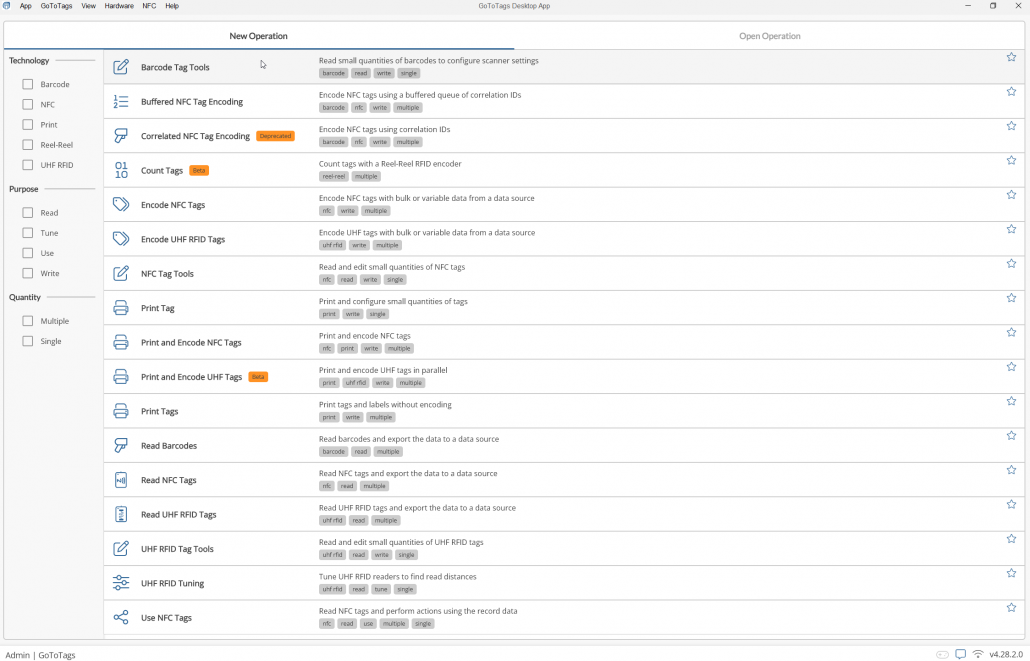
Selecting an Operation
Operations can be selected in the operation chooser from the displayed list. Deciding which operation to use depends on the specific requirements of the project. To determine what solution is best, view the list of operation types.
Selecting a Default Operation
Selecting an operation as the default operation will cause the app to open directly to it. This is useful for cases where the app is used for one main purpose on a given computer. To make an operation the default, open the operation and select “App -> Default Operation” in the menu bar.
Favoriting an Operation
Operation can be favorited to allow them to be accessed quickly. To favorite an operation, navigate to the operation chooser and click the star to the right of the operation. Once favorited, the operation will be moved to the top of the page and appear under “App -> Switch Operation” in the menu bar.
 https://gototags.com/wp-content/uploads/sites/12/2025/11/desktop_app_v4300_release.jpg
454
1300
bethanjohnson
https://gototags.com/wp-content/uploads/sites/12/2024/01/gototags_logo.svg
bethanjohnson2025-11-06 14:17:562025-11-14 12:02:34GoToTags Desktop App v4.30.0 Introduces Two Specialized NFC Encoding Operations
https://gototags.com/wp-content/uploads/sites/12/2025/11/desktop_app_v4300_release.jpg
454
1300
bethanjohnson
https://gototags.com/wp-content/uploads/sites/12/2024/01/gototags_logo.svg
bethanjohnson2025-11-06 14:17:562025-11-14 12:02:34GoToTags Desktop App v4.30.0 Introduces Two Specialized NFC Encoding Operations https://gototags.com/wp-content/uploads/sites/12/2025/10/posts_use_nfc_tags_iphone-copy.jpg
455
1300
bethanjohnson
https://gototags.com/wp-content/uploads/sites/12/2024/01/gototags_logo.svg
bethanjohnson2025-10-31 13:24:332025-11-14 12:02:58How to Use NFC Tags with an iPhone (iOS)
https://gototags.com/wp-content/uploads/sites/12/2025/10/posts_use_nfc_tags_iphone-copy.jpg
455
1300
bethanjohnson
https://gototags.com/wp-content/uploads/sites/12/2024/01/gototags_logo.svg
bethanjohnson2025-10-31 13:24:332025-11-14 12:02:58How to Use NFC Tags with an iPhone (iOS) https://gototags.com/wp-content/uploads/sites/12/2025/10/posts_nfc_chip_performance.jpg
455
1300
bethanjohnson
https://gototags.com/wp-content/uploads/sites/12/2024/01/gototags_logo.svg
bethanjohnson2025-10-23 08:22:392025-10-23 08:22:39Which NFC Chip Type is the Best?
https://gototags.com/wp-content/uploads/sites/12/2025/10/posts_nfc_chip_performance.jpg
455
1300
bethanjohnson
https://gototags.com/wp-content/uploads/sites/12/2024/01/gototags_logo.svg
bethanjohnson2025-10-23 08:22:392025-10-23 08:22:39Which NFC Chip Type is the Best?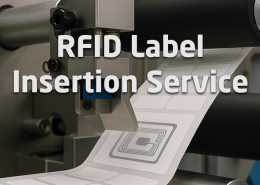 https://gototags.com/wp-content/uploads/sites/12/2025/10/posts_rfid_label_insertion.jpg
455
1300
bethanjohnson
https://gototags.com/wp-content/uploads/sites/12/2024/01/gototags_logo.svg
bethanjohnson2025-10-10 14:12:312025-10-10 15:31:44GoToTags RFID Label Insertion Service
https://gototags.com/wp-content/uploads/sites/12/2025/10/posts_rfid_label_insertion.jpg
455
1300
bethanjohnson
https://gototags.com/wp-content/uploads/sites/12/2024/01/gototags_logo.svg
bethanjohnson2025-10-10 14:12:312025-10-10 15:31:44GoToTags RFID Label Insertion Service